Aug 13, 2018

What should I do... Moving to Australia

Image result for Flying to Australia


First of all, it’s been a while I am writing something that too unrelated to the name of the blog. This is completely non-technical and my experience with my move to Sydney, Australia. This is written in assumption of you are no one in Sydney and you are starting your journey by your own, like I am doing.

Today almost been a month now I landed here in this beautiful land for good after getting my PR.
So now coming to the title, “What should I do?” yes exactly same question came to my mind when I got my PR done last year. I was thinking, and exactly in the same dilemma that should I go or should I not?

Many aspects to this question and are bound to come to our mind. As we have family, friends, house back in India with good or at least settled and secured job. So, this is very obvious that we think about it. Believe me I am not regretting my decision. People are so nice here and so much positivism. I am truly loving it.

Till this time, when I am writing this I am looking for job here. I was well settled in Pune. But, I am very much explorer and always wanted to be at the better place with best lifestyle. So, I took a decision to move ahead and I came here to explore many more opportunities.

There are many like me, who are having same question in their mind. Guys, if you got the VISA means there is something in you. You earned it by passing exam, paying heavy VISA fees. If you are at this point, then I would say, you must go for the next race. 

To warn you, it is tough, very very tough to take any decision, it's up-to self.

What should I do?

If you have decided to take a challenge…

-      Do homework

Now what is this? What kind of homework? We are not going to school. But people, you are coming to different land altogether. You would need four basic things for living where ever you go, those are food, clothes, shelter and most important is JOB. Clothes you will obviously get it with yourself. But you would need to look for shelter and food.

-        Preparation for Air-Tickets
Google for best available flights https://www.skyscanner.com.au/ is one of the best websites that may help you choosing direct or connecting flights, it is advisable to find local travel agencies in your hometown for cheaper options, there is no suitable day or date advised to immigrants unless advised by the relevant department. You can land anytime of the year and it’s better to arrive bit early or prior to your end date of arrival given in your visa grant/approval letter. The journey to Australian cities may be long and tiring, also depending on the airline services, you have to do your research matching all your needs and comforts with each airline. Peak Seasons and local festivals such as Eid, Christmas, Easter, Diwali or Holi tickets price may be sold at higher prices.

-        Most Important Things to do after arrive here

1.      Get the Medicare card

For Sydney you can visit any Service NSW office and apply for on the given site. http://www.service.nsw.gov.au/service-centre

       
    Clothes

Below listed things for the clothes would be enough and more than that won’t fit in your bag as well 😊

To the minimum, one requires these clothes for easy survival also depending on an individual’s budget.

Men’s
a) 5 pairs of Jeans
b) 10 T-Shirts
c) 5 Dress/Suit Pants
d) 10 Business Shirts
e) 1-2 Leather/Casual Jacket
f) 1-2 Formal Jacket (This is important. Get lesser jeans but get the jackets.)
g) 2 Business Suits (This is important. Get lesser jeans but get the jackets.)
h) Shoes: 1 pair of each Casual shoes/ Loafers, 1 pair of business pattern shoes, 1 pair of joggers/sneakers, 1 pair of thongs(slippers)

Women’s Apparel
a) 10 complete Suits (Trouser + shirts)
b) 5 pair of jeans
c) 5 business Shirts
d) 1-2 Leather/Casual Jacket
f) 1-2 Formal Jacket
g) 4 Business Shirts and Trousers each
h) 5-10 scarves/ headscarves/mufflers
i) Shoes: 2 pair of each Casual shoes, 1 pair of business pattern shoes (Heels, etc), 1 pair of joggers/sneakers, 1 pair of thongs(slippers)

Clothes for Children under 18 Almost same but could be few more in numbers as of adults given above; however, infants and toddlers should be treated separately in numbers (quantities). Shoes same as of adults.

-        Shelter (Place to live)

So, to search for shelter create account on www.flatmates.com, www.gumtree.com and search for options for your choice.

Here rents are weekly. Generally, owner needs two advance rent for your stay. If you are booking from India, still they will ask for advance payment which you can transfer in their bank account.

Here, many Indians live in west side of the city and areas like Parramatta, Westmead, WentworthVille, Toongabie, etc. Some already residing Indians do have business for accommodation, one of them I know is http://nivasaapartments.com.au/. And these areas have good amount of Indian food stalls or hotels where you can find many Indian delicacies.
I have decided before coming here, that I will not reside in these areas atleast for first 6 months. It is because I wanted to understand Australian culture and people. Also, I didn’t want to spend too much on commute so I preferred to stay in inner Sydney area. So, I can walk around the city and explore the offices, roads and enjoy the night life 😉

-        Bank Accounts

Additionally, you would need money or the bank accounts to be opened so that once you land here you can start spending. Nothing is free in today’s world. Plus, mind it, you would be spending in dollars so better to get Australian card rather than doing transactions on Indian card.

This is one the most important things to do before you come to Australian land. There are many banks here which provides the facilty to open online bank accounts from overseas. To name few are http://commbank.com.au, https://www.nab.com.au/.

One should open account in one of the banks before landing here. Benefit of this is:
1.      Transfer your funds from Indian bank to Australian bank, it takes 2 days for transfer.
2.      Your mind is free of tension of funds.
3.      You can just take $500 with you while travelling from India
4.      Come here, validate yourself and get your debit card and start tapping where ever needed. You hardly need cash here.

Here is the link to open commonwealth bank account : https://www.commbank.com.au/personal/accounts/savings-accounts.html

-        Join Groups

There are many Facebook and WhatsApp groups which gives you lot of information about your queries. Some of the Facebook groups are open to all and some are closed where you can send request to admin and give answers to some questions then they can add you there.

FACEBOOK GROUPS:

if you craving for desi street food  without making a hole in your pocket
DesiTapri - https://www.facebook.com/DesiTapri/


-        JOB

MOST IMPORTANTLY, ONE CAN NOT GET JOB FROM INDIA. HERE PEOPLE WANT TO SEE YOU. SO DON'T EVEN THINK OF IT.

Here people do say that, one does get job but it takes 2-3 months. Some people may take longer 6-7 months. But frankly, never lose hope and always be positive.

Most importantly, here recruiters look for only 2 sites
So, get your profile updated on these two sites only. 

Grocery

One can go to supermarkets like Coles, Aldi, WoolWorth were you can get good variety of Indian spices. Plus, you can get ready-to-eat food as well.

Documents

Generally, immigration officer don't ask you for any documents but it is always advisable to all your VISA and Medical related documents, specially for kids with you, to avoid last minute hassles.

Hope this page solve your dilemma :)

--- 
Kaushik

Jan 13, 2017

Case Insensitive Xpath

It has been observed that for many a times we would need to play with XPaths while working on web based automation using Selenium Web Driver. It was one of the needs to handle the case insensitive xpath, and looking at the xpath functions I found out lower-case and translate functions, using which we can work case insensitivity.

You can get more details here for these two functions.

Jan 3, 2017

C# Selenium Webdriver - Code to take browser parameter from config file

App.Config::

<?xml version="1.0" encoding="utf-8" ?>
<configuration>
 
    <configSections>
 
    </configSections>
 
  <appSettings>
    <add key="browser" value="ff" />
    <add key ="url" value="YOUR APPLICATION URL"/>
    <add key ="userName" value="YOUR APPLICATION USERNAME"/>
    <add key ="password" value ="YOUR APPLICATION PASSWORD"/>
  </appSettings>

</configuration>
       

Class File code::


IWebDriver driver;
        /// <summary>
        /// This method is used to start the browser instance depending on the browser parameter from configuration file.
        /// </summary>
        [TestInitialize]
        public void Start()
        {
            switch (ConfigurationManager.AppSettings["browser"])
            {
                case "ff":
                    {
                        driver = new FirefoxDriver();
                        break;
                    }
                case "ch":
                    {
                        driver = new ChromeDriver();
                        break;
                    }
                case "ie":
                    {
                        driver = new InternetExplorerDriver();
                        break;
                    }
                default:
                    {
                        Console.WriteLine("Something is wrong.. Please check.");
                        break;
                    }
            }
        }

Selenium Webdriver window handling with C#

/// <summary>
/// Wrapper to switch to new window
/// </summary>
public void SwitchToNewWindow()
{          
     driver.SwitchTo().Window(driver.WindowHandles.Last());
}

/// <summary>
/// Wrapper to switch to original window
/// </summary>
public void SwitchToOriginalWindow()
{
     driver.SwitchTo().Window(driver.WindowHandles.First());
}

May 13, 2016

Selenium - Handling dynamic web UI elements using- Awesome way

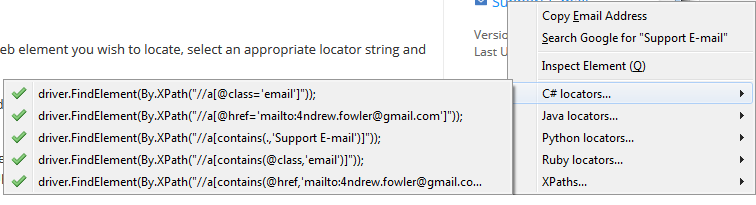
Guys, I found below addon to firefox which will give us XPATHs for the dynamic elements. This addon gives us XPATHs for C#, Java, Python and Ruby.


Go to any element on web page, right click on mouse and see the magic :)

Have a look::

Oct 7, 2015

Swagger - The API documentation

Most of are using web service APIs in daily codes, but there is no real standard used or implementation for the same. While surfing and searching about the documentation of such service API, I've come across following links which would be beneficial for the people those who want to understand the service documentations and their usage and implementations..

Swagger Wiki

Documenting WS using Swagger

RestFul API documentation using Swagger


Web Services Testing using SoapUI and Groovy

Found a good fundamentals about webservices testing or SOA with SoapUI and the prerequisites needed for the same. You can take a look at your free time, this will also helpful for the people who are looking for how to carry out functional testing of webservices using groovy.

Jul 22, 2015

Sending email attachment with test execution status [PASSED or FAILED]- Java Code Examples

import java.util.Properties;

import javax.activation.DataHandler;
import javax.activation.DataSource;
import javax.activation.FileDataSource;
import javax.mail.Message;
import javax.mail.Multipart;
import javax.mail.Session;
import javax.mail.Transport;
import javax.mail.internet.InternetAddress;
import javax.mail.internet.MimeBodyPart;
import javax.mail.internet.MimeMessage;
import javax.mail.internet.MimeMultipart;

public class SendMail {
    public static void execute(String reportFileName) throws Exception {

        String[] to = { "<email address of recipient>" };
        String[] cc = {};
        String[] bcc = {};

        SendMail.sendMail(
                "<FROM EMAIL ADDRESS>",
                "<PASSWORD>",
                "smtp.gmail.com",
                "465",
                "true",
                "true",
                true,
                "javax.net.ssl.SSLSocketFactory",
                "false",
                to,
                cc,
                bcc,
                "Automation <SUBJECT>",
                "This is auto generated email for <Project Name> Automation after test suite run! "
                        + "Please check attachment for the detailed report and do not hit reply button...",
                <PATH OF html file, resides under test-output folder>, reportFileName);
    }

    public static boolean sendMail(String userName, String passWord, String host, String port,
            String starttls, String auth, boolean debug, String socketFactoryClass,
            String fallback, String[] to, String[] cc, String[] bcc, String subject, String text,
            String attachmentPath, String attachmentName) {

        Multipart multipart = new MimeMultipart();
        MimeBodyPart messageBodyPart = new MimeBodyPart();

        // Object Instantiation of a properties file.
        Properties props = new Properties();
        props.put("mail.smtp.user", userName);
        props.put("mail.smtp.host", host);
        if (!"".equals(port)) {
            props.put("mail.smtp.port", port);
        }
        if (!"".equals(starttls)) {
            props.put("mail.smtp.starttls.enable", starttls);
            props.put("mail.smtp.auth", auth);
        }
        if (debug) {
            props.put("mail.smtp.debug", "true");
        } else {
            props.put("mail.smtp.debug", "false");
        }
        if (!"".equals(port)) {
            props.put("mail.smtp.socketFactory.port", port);
        }
        if (!"".equals(socketFactoryClass)) {
            props.put("mail.smtp.socketFactory.class", socketFactoryClass);
        }
        if (!"".equals(fallback)) {
            props.put("mail.smtp.socketFactory.fallback", fallback);
        }
        try {
            Session session = Session.getDefaultInstance(props, null);
            session.setDebug(debug);
            MimeMessage msg = new MimeMessage(session);

            MimeBodyPart htmlPart = new MimeBodyPart();
            htmlPart.setContent(text, "text/html");
            multipart.addBodyPart(htmlPart);

            DataSource source = new FileDataSource(attachmentPath);
            messageBodyPart.setDataHandler(new DataHandler(source));
            messageBodyPart.setFileName(attachmentName);

//THIS CODE GIVIES THE STATUS IN EMAIL SUBJECT FOR PASS OR FAILING OF TESTS
            if (((String) messageBodyPart.getContent()).contains("FAILED TESTS"))
                msg.setSubject("FAILED :: " + subject);
            else if (((String) messageBodyPart.getContent()).contains("PASSED TESTS"))
                msg.setSubject("PASSED :: " + subject);

            multipart.addBodyPart(messageBodyPart);

            msg.setContent(multipart);
            msg.setFrom(new InternetAddress(userName));

            for (int i = 0; i < to.length; i++) {
                msg.addRecipient(Message.RecipientType.TO, new InternetAddress(to[i]));
            }

            for (int i = 0; i < cc.length; i++) {
                msg.addRecipient(Message.RecipientType.CC, new InternetAddress(cc[i]));
            }

            for (int i = 0; i < bcc.length; i++) {
                msg.addRecipient(Message.RecipientType.BCC, new InternetAddress(bcc[i]));
            }

            msg.saveChanges();

            Transport transport = session.getTransport("smtp");
            transport.connect(host, userName, passWord);
            transport.sendMessage(msg, msg.getAllRecipients());
            transport.close();

            return true;

        } catch (Exception mex) {
            mex.printStackTrace();
            return false;
        }
    }
}

Jul 2, 2015

How to pass date in DatePicker control of JQuery through JAVA and Selenium

Passing the date in DatePicker control of JQuery using JAVA code..

((JavascriptExecutor) driver)
                .executeScript("document.getElementById('<element_Id>').removeAttribute('readonly',0);");
WebElement fromDate = findElement("element_Id");
fromDate.clear();
fromDate.sendKeys(<DATE IN REQ FORMAT eg : 07/02/2015>);

How to get past and future dates in JAVA

Java Code to get the current date, previous date and future date.

Import libraries ::
import java.text.DateFormat;
import java.text.SimpleDateFormat;
import java.util.Calendar;
import java.util.GregorianCalendar;


CODE::
DateFormat format = new SimpleDateFormat("MM-dd-yyyy");
Calendar date = new GregorianCalendar();
System.out.println("Current Date :: " + format.format(date.getTime()));
date.add(Calendar.DATE, -30);
System.out.println("Previous Date :: " + format.format(date.getTime()));
date = new GregorianCalendar();
System.out.println("Current Date :: " + format.format(date.getTime()));
date.add(Calendar.DATE, +30);
System.out.println("Next Date :: " + format.format(date.getTime()));

Jun 16, 2015

IMPORTANT :: Know your salary slip..

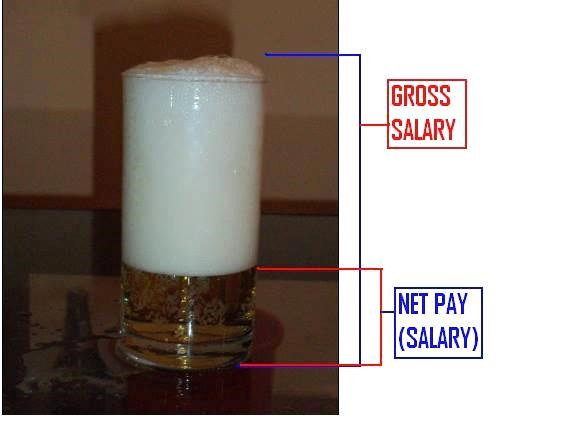
Most of us like me do not spend much time in understanding our salary slips or never gives attention to it. We may never come to know what are we getting and what are we paying as tax!!


Read on below link to know more!!!

https://scripbox.com/blog/everything-you-need-to-know-about-your-salary-slip/?utm_source=linkedin&utm_medium=social&utm_content=salary-slip&utm_campaign=blogpost

Jun 10, 2015

Step-by-step guide to Online Income tax filing in INDIA

Big Thanks to my friend Kedar J. for the compilation!!!

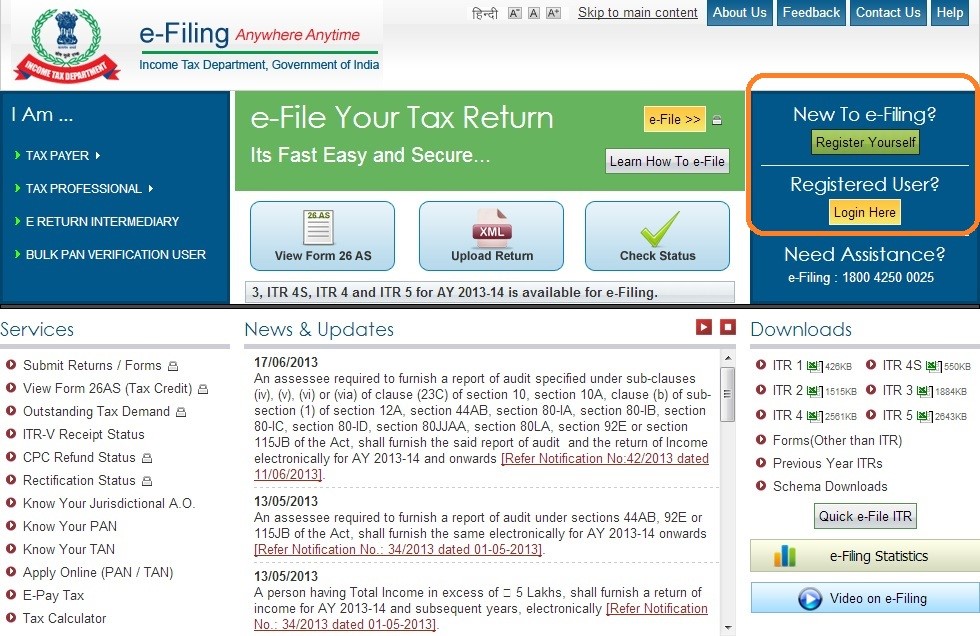
1) Log on to https://incometaxindiaefiling.gov.in/e-Filing/


If you are first time user, click “Register Yourself” and follow the process.
Click “Login Here” if you already have registered and enter your credentials to log in

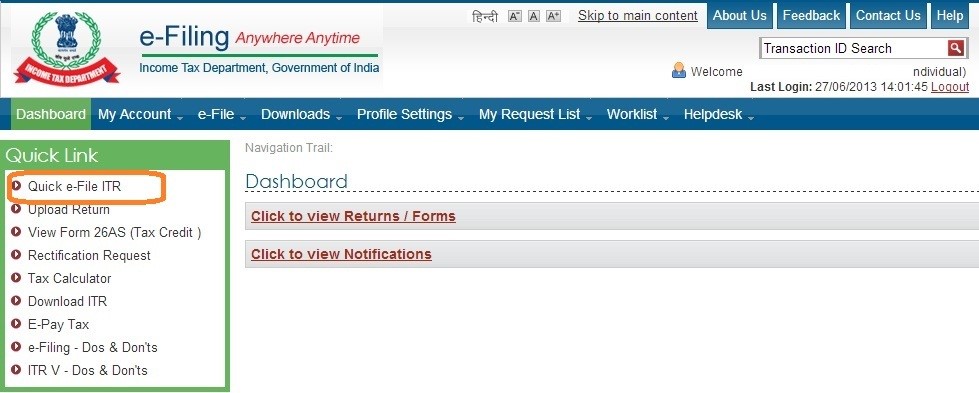
12)  Here is what you see after logging in
              

Click “Quick e-File ITR”

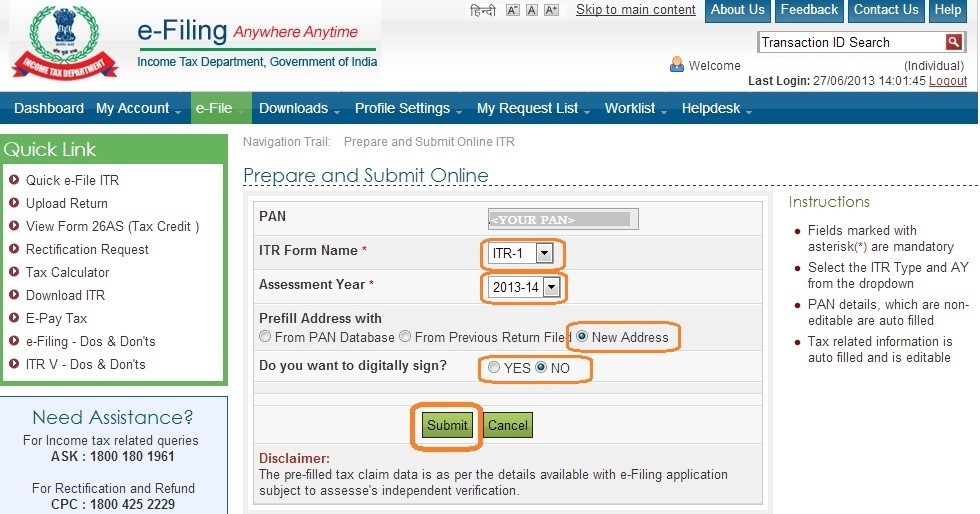
3)      You will land in following page 

a.       Ensure you have correct PAN
b.      Fill ITR form name – typically ITR-1 for most of the cases
c.       Assessment Year  = 2013-14
d.      Prefill Address with = “New Address”
e.      Digital sign = NO
f.   Click “Submit”

        
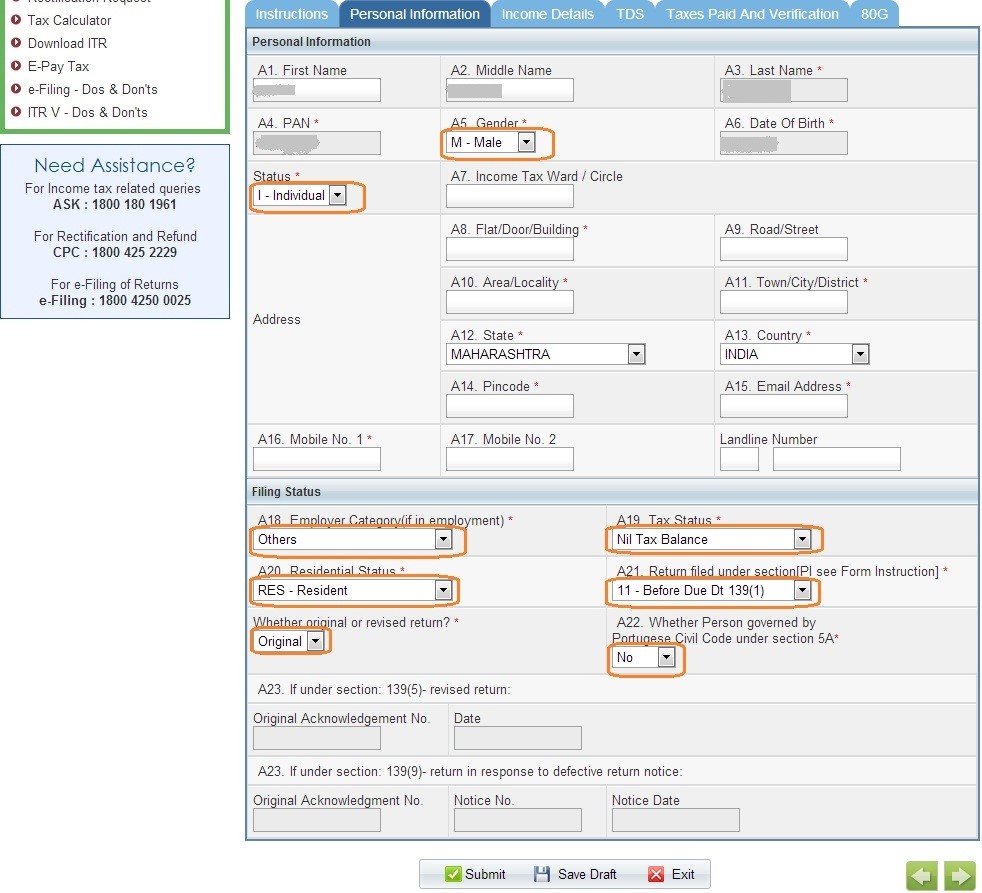
      4)      On submitting a details form shows up


     5)      Personal Information


a.      Please fill up the highlighted fields as applicable in “Personal Information
                          b. For most of us, the Filing Status section will be as shown above.
      6)      Income Details are to be filled by individual as per their Form 16
       Fill up all the required fiends from Form 16

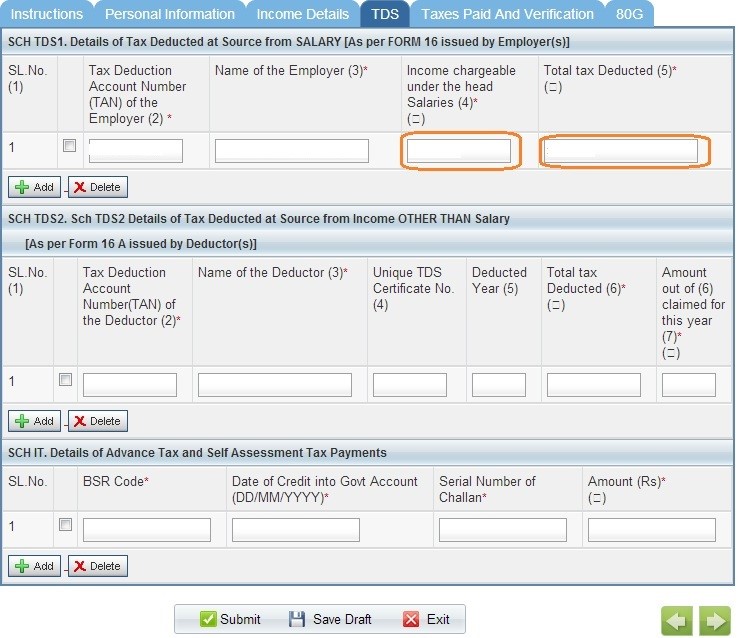
     7)      Now the TDS section

Only following fields are to be filled from Form 16
a.      Income chargeable under the head “Salaries”
b.      Total tax deducted 


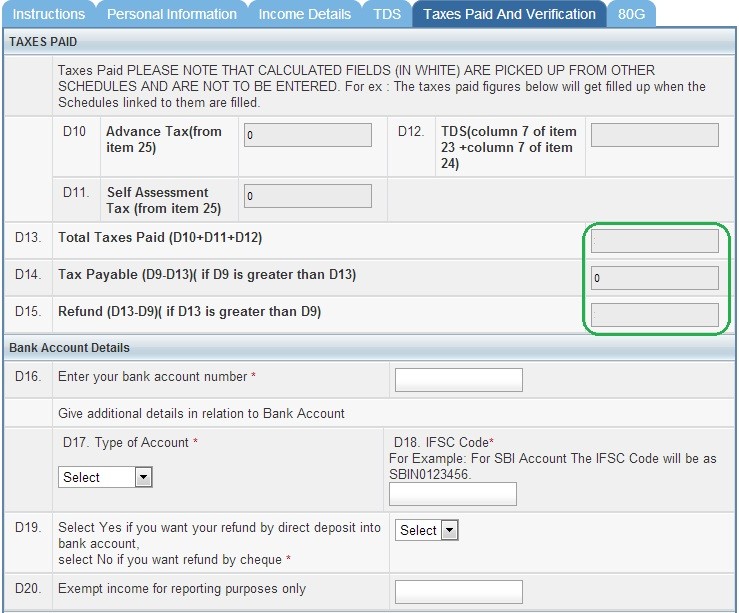
    8)      Taxes Paid And Verification
a.      Ensure the green outlined fields are appropriate.


     9)      Submission process
·         Keep ‘Saving the draft’ to save your changes
·         Finally once everything is filled, click the “Submit” button.
    10)      What next?
·         Wait till you get the email from income tax department.
·         Open the PDF in the email’s attachment, (which has password: <PANDOB> 
·         Take a printout of that PDF doc (of course after carefully verifying everything)
·         Sign it and post it to the address given on that doc. (don’t forget to affix Rs. 10 stamps)


Jun 2, 2015

Eclipse IDE keyboard shortcuts for JAVA

Eclipse shortcuts

Keyboard Command
Purpose
Ctrl+N
Create new project using the Wizard
Ctrl+Alt+N
Create new project, file, class, etc.
Alt+f, then .
Open project, file, etc.
Ctrl+Shift+R
Open Resource (file, folder or project)
Alt+Enter
Show and access file properties
Ctrl+S
Save current file
Ctrl+Shift+S
Save all files
Ctrl+W
Close current file
Ctrl+Shift+W
Close all files
F5
Refresh content of selected element with local file system
F12
Jump to Editor Window
Ctrl+Page Down/Ctrl+Page Up
Switch to next editor / switch to previous editor
Ctrl+M
Maximize or un-maximize current Editor Window (also works for other Windows)
Ctrl+E
Show list of open Editors. Use arrow keys and enter to switch
Ctrl+F6/Ctrl+Shift+F6
Show list of open Editors. Similar to ctrl+e but switches immediately upon release of ctrl
Alt+Arrow Left/Alt+Arrow Right
Go to previous / go to next Editor Window
Alt+-
Open Editor Window Option menu
Ctrl+F10
Show view menu
Ctrl+F10, then n
Show or hide line numbers
Ctrl+Shift+Q
Show or hide the diff column on the left (indicates changes since last save)
Home/End
Jump to beginning / jump to end of indention. Press home twice to jump to beginning of line
Ctrl+Home/End
Jump to beginning / jump to end of source
Ctrl+Arrow Right/Arrow Left
Jump one word to the left / one word to the right
Ctrl+Shift+Arrow Down/Arrow Up
Jump to previous / jump to next method
Ctrl+L
Jump to Line Number. To hide/show line numbers, press ctrl+F10 and select 'Show Line Numbers'
Ctrl+Q
Jump to last location edited
Ctrl+./Ctrl+,
Jump to next / jump to previous compiler syntax warning or error
Ctrl+Shift+P
With a bracket selected: jump to the matching closing or opening bracket
Ctrl+[+]/Ctrl+- on numeric keyboard
Collapse / Expand current method or class
Ctrl+[/]/Ctrl+* on numeric keyboard
Collapse / Expand all methods or classes
Ctrl+Arrow Down/Ctrl+Arrow Up
Scroll Editor without changing cursor position
Alt+Page Up/Alt+Page Down
Next Sub-Tab / Previous Sub-Tab
Shift+Arrow Right/Arrow Left
Expand selection by one character to the left / to the right
Ctrl+Shift+Arrow Right/Arrow Left
Expand selection to next / previous word
Shift+Arrow Down/Arrow Up
Expand selection by one line down / one line up
Shift+End/Home
Expand selection to end / to beginning of line
Ctrl+A
Select all
Alt+Shift+Arrow Up
Expand selection to current element (e.g. current one-line expression or content within brackets)
Alt+Shift+Arrow Left/Arrow Right
Expand selection to next / previous element
Alt+Shift+Arrow Down
Reduce previously expanded selection by one step
Ctrl+C/Ctrl+X/Ctrl+V
Cut, copy and paste
Ctrl+Z
Undo last action
Ctrl+Y
Redo last (undone) action
Ctrl+D
Delete Line
Alt+Arrow Up/Arrow Down
Move current line or selection up or down
Ctrl+Alt+Arrow Up/Ctrl+Alt+Arrow Down/
Duplicate current line or selection up or down
Ctrl+Delete
Delete next word
Ctrl+Backspace
Delete previous word
Shift+Enter
Enter line below current line
Shift+Ctrl+Enter
Enter line above current line
Insert
Switch between insert and overwrite mode
Shift+Ctrl+Y
Change selection to all lower case
Shift+Ctrl+X
Change selection to all upper case
Ctrl+F
Open find and replace dialog
Ctrl+K/Ctrl+Shift+K
Find previous / find next occurrence of search term 
Ctrl+H
Search Work-space 
Ctrl+J/Ctrl+Shift+J
Incremental search forward / backwards. Type search term after pressing ctrl+j, there is now search window
Ctrl+Shift+O
Open a resource search dialog to find any class
Tab/Shift+Tab
Increase / decrease indent of selected text
Ctrl+I
Correct indention of selected text or of current line
Ctrl+Shift+F
Autoformat all code in Editor using code formatter
Ctrl+/
Comment / un-comment line or selection
Ctrl+Shift+/
Add Block Comment around selection
Ctrl+Shift+\
Remove Block Comment
Alt+Shift+J
Add Element Comment 
Ctrl+Space
Opens Content Assist 
Ctrl+1
Open Quick Fix and Quick Assist
Alt+/
Propose word completion. Repeatedly press alt+/ until reaching correct name
Ctrl+Shift+Insert
Deactivate or activate Smart Insert Mode 
Ctrl+O
Show code outline / structure
F2
Open class, method, or variable information 
F3
Open Declaration: Jump to Declaration of selected class, method, or parameter
F4
Open Type Hierarchy window for selected item
Ctrl+T
Show / open Quick Type Hierarchy for selected item
Ctrl+Shift+T
Open Type in Hierarchy
Ctrl+Alt+H
Open Call Hierarchy
Ctrl+U
Find occurrences of expression in current file
Ctrl+move over method
Open Declaration or Implementation
Alt+Shift+R
Rename selected element and all references
Alt+Shift+V
Move selected element to other class or file 
Ctrl+Shift+C
Change method signature
Alt+Shift+M
Extract selection to method
Alt+Shift+L
Extract local variable: Create and assigns a variable from a selected expression
Alt+Shift+I
Inline selected local variables, methods, or constants if possible 
Ctrl+F11
Save and launch application (run)
F11
Debug
F5
Step Into function
F6
Next step (line by line)
F7
Step out
F8
Skip to next Breakpoint
Ctrl+F7/Ctrl+Shift+F7
Switch forward / backward between views (panels). Useful for switching back and forth between Package Explorer and Editor.
Ctrl+F8/Ctrl+Shift+F8
Switch forward / backward between perspectives
Ctrl+P
Print
F1
Open Eclipse Help
Shift+F10
Show Context Menu right click with mouse
Ctrl+Alt+S
Synchronize with Repository
Ctrl+Alt+C
Commit
Ctrl+Alt+U
Update
Ctrl+Alt+D
Update to Revision
Ctrl+Alt+E
Merge
Ctrl+Alt+T
Show Properties
Ctrl+Alt+I
Add to svn:ignore